Who can access audio?
Your account is separate from other customers. Authorised Roger operators can access full audio and transcripts for support and operation.
Access explained ↗For Gas Safe registered engineers
Read the results from your analyser aloud as you work. Roger records each reading and puts it in the right field in your report.
“Kitchen boiler. Service readings.
Maximum rate: CO, twenty-four parts per million.
CO two, eight point eight percent.
Minimum rate: CO, twelve parts per million.
CO two, eight point seven percent.
Gas rate, two point five cubic metres per hour.
Each reading, in its report field.
Roger logs into your existing reporting software and fills in the readings for you.
Kitchen boiler · Service readings
Maximum and minimum rates stay separate.
Your readings. The right fields. No retyping.
Reporting software, for example:Gas Engineer Software · EasyGas
You read the instrument. Say each result aloud.
Roger records it. Values, units and context.
Check the WhatsApp recap. Confirm, then review your report.
Read the results aloud. Confirm the WhatsApp recap. Review your completed report.
Say the appliance or circuit, then read each measurement aloud as you take it. Roger records the values and units while you carry on working.
“Kitchen boiler. Service readings. Maximum rate: CO, twenty-four parts per million. CO two, eight point eight percent. Minimum rate: CO, twelve parts per million. CO two, eight point seven percent. Gas rate, two point five cubic metres per hour.”
Roger sends you a WhatsApp recap of the captured readings. Confirm they’re correct or send a correction before you review the completed report.
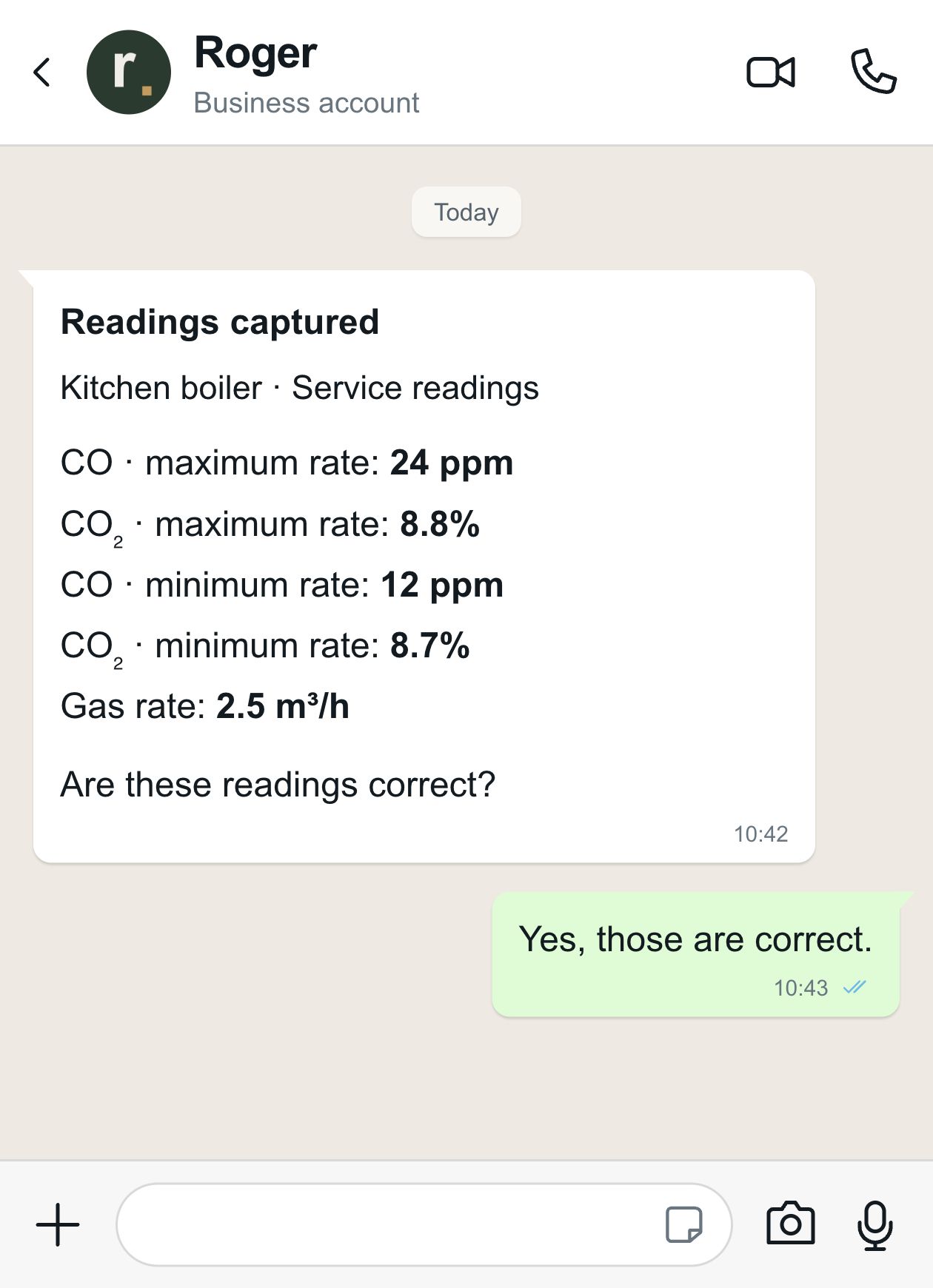
Roger logs into the reporting software you already use, opens the job and fills in your confirmed readings. You review and sign the record; Roger sends it and saves it to the job.
Roger enters the readings in your account, against the right job and report.
Reporting software examples
Gas service records and landlord gas safety records.
Gas servicing, maintenance and safety records.
You review & sign. Roger sends & saves.
You review and sign. Roger sends the report and saves it to the job.
Your account is separate from other customers. Authorised Roger operators can access full audio and transcripts for support and operation.
Access explained ↗Audio passes through your phone to Roger’s cloud storage and processing services. The recording project is in Ireland; other providers process data internationally.
Storage & providers ↗Cloud recordings and transcripts are kept until you request deletion. Switching capture off does not erase earlier recordings.
Delete recordings or your account ↗While recording is on, the mic can capture surrounding conversation as well as your readings. A report extract is not the full recording. For a focused task, record a short job note or send a voice note with just the details you need. Stop capture and switch off the wearable before a private conversation. Recording and client confidentiality.
Roger uses cloud storage, transcription and AI providers to process your work. Supabase stores recordings; Neon stores assistant conversations and action records. OpenAI and, for relevant recording features, ElevenLabs and pyannote process audio or task context. WhatsApp carries messages you exchange with Roger. Your account is separated from other Roger customers. See the providers and what each handles.
No. Cloud recordings and transcripts are kept until you request deletion. Stopping capture does not erase existing uploads, and a separate wearable can retain its own recordings. Request deletion of a recording or your account through the app’s privacy controls or privacy@rogerassistant.com. Read what deletion covers.
Roger does not use your audio, transcripts, chats, attachments or connected-account data to train or fine-tune AI models, and requires its AI providers to exclude that content from training. Processing your report is separate from model training. Read the no-training policy.
Your findings, prepared for review and signature.
Your readings, work and recommendations, recorded.
What you found, fixed and recommend next.
Your scope, parts and prices, brought together.
Approved work and charges, ready to send.
Confirmed dates and clear customer messages.
Yes. Roger fills it in your existing reporting software. You review and sign, then Roger sends the signed copy to the recipient you approve and saves it to the job.
Yes. Name the job and appliance, then read out each result as you take it. Roger keeps maximum and minimum rates separate and sends the captured readings back on WhatsApp for you to confirm.
Reply to the WhatsApp recap with the correction. Confirm the updated readings before you review and sign the report.
You can start a conversation with Roger on WhatsApp and share a voice note, message or document. The mic adds context from your working day without having to dictate every note into your phone.
Email support@rogerassistant.com. We help you connect the mic and set up the documents and accounts you use. You can also find the setup guide and help centre here.